-
1.12.1October 2026
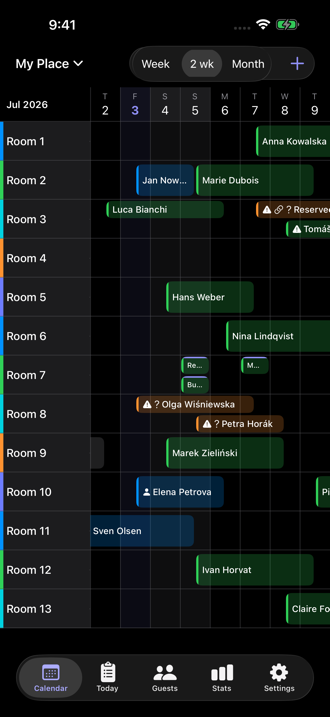
On iOS 17: the stay-dates calendar now opens on your check-in month, and the calendar grows as you scroll to its edge — just like on newer iOS versions. · Reliability and polish improvements.
-
1.12October 2026
Ready for iPhone Duo — the calendar now fits neatly beside the side controls when folded or turned sideways. · Reliability and polish improvements.
-
1.11October 2026
Reception mode (free): for a device you share with staff. They work with reservations and guests as usual, while rooms, backups, sharing and price settings stay hidden. Turning it off asks for Face ID, Touch ID or the device passcode. Settings → Reception mode. · Restoring a backup now shows one clear number of reservations added. · Reliability and polish improvements.
-
1.10October 2026
Google Sheet (Premium, part of calendar sharing): InnGrid keeps your bookings in a spreadsheet on your own Google Drive and updates it after every change — for a partner without an iPhone. Add a separate sheet for whoever cleans (no names, no prices) or for the kitchen (meals for each day). The people you share it with can view it, not change it. Settings → Google Sheet. · Go back to a backup exactly: when you restore a backup, choose "Replace everything with this backup…". You see what will change first, and you can undo it. Bookings from booking sites are not affected. · Restoring a backup and importing a CSV from a file work again. · Reliability and polish improvements.
-
1.9.3September 2026
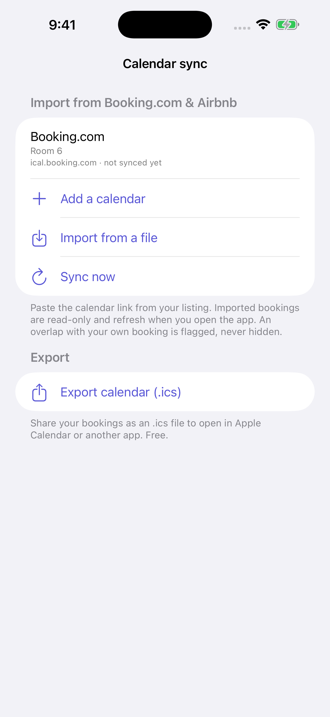
Occupancy for booking sites (Premium): give Booking.com, Airbnb or Holidu one link per room, and they see which nights are taken. No server of ours, only the word "Reserved", never guest names. Settings → Calendar sync. · Better button contrast in Dark Mode. · Toolbar buttons ready for new iPhone screens.
-
1.9.2September 2026
Reliability and polish improvements.
-
1.9.1September 2026
Reliability and polish improvements.
-
1.9August 2026
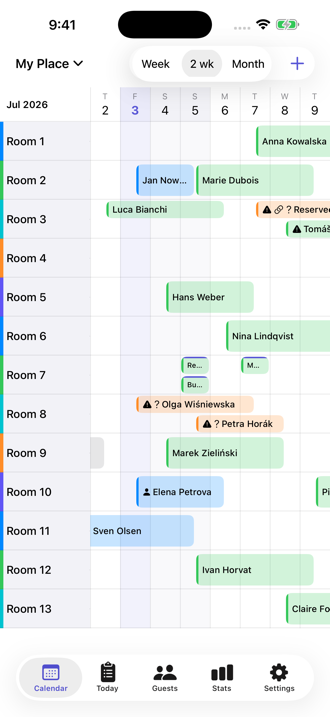
Note how many people are coming: a booking can carry a guest count, and the bar on
the calendar shows it next to the name — Kowalski +3 when four people arrive; the
day plan shows it beside the room, and the kitchen count can add up people and not only
bookings · a notification when Booking.com, Airbnb or another calendar link
brings in a new booking — also when the app is closed, and if that booking
lands on nights already taken, the notification says so rather than leaving it to the
calendar · see where a booking came from: imported and phone bookings now
carry a small mark before the guest name, while direct bookings look exactly as before
· leave a note for whoever cleans — type it on the room’s row in
Day plan and it reaches the phone of the person you invited as staff, beside the room
they tick off · eleven more languages, 24 in all · plus reliability
and polish improvements.
-
1.8August 2026
Ask InnGrid without opening it: type or say “InnGrid arrivals” or
“InnGrid today’s plan” in Spotlight, in Shortcuts or to Siri —
every phrase includes the app name, and that is how iOS finds it; the first time you
ask, Siri offers to turn InnGrid’s shortcuts on: tap once and it answers from
then on. Free, like the rest of the calendar · enter prices per night,
if that is how you bill — choose it once in Settings → Money, or switch it
on any booking longer than one night · a stay that runs across a month boundary
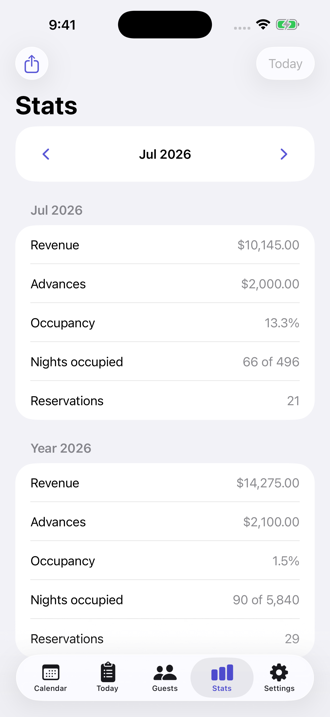
now splits its revenue between both months by the nights actually spent in each,
so a month’s total in Stats matches what happened in it; amounts you already
saved are unchanged · Greek and Russian — 13 languages in all, and
the app follows whatever language your iPhone is set to · plus reliability and
polish improvements.
-
1.7.7August 2026
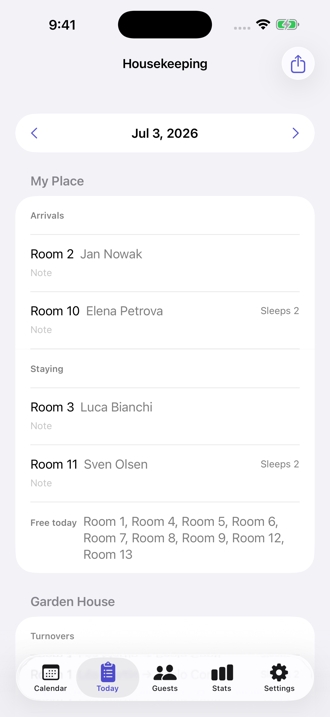
Cleaning, from assigned to done: assign a turnover or a departure to whoever
cleans it, and they tick it off with one tap — your Today tab then shows the time
and who did it; a tick made with no signal survives closing the app and reads
“unsent” until it goes out · “Invite staff” gives
that person their own link to one building: the rooms and what needs doing there,
never your bookings, guest names or prices — and free for them, like the rest of
the calendar · your day on the Lock Screen: three widget shapes for
today’s arrivals and departures, with guest names never shown while the phone is
locked · press and hold a booking to change its status, share a confirmation or
edit it, without leaving the calendar · a day-stay range across several rooms is
now one booking · on a Mac, dialogs fit the window and Esc closes,
⌘↩ saves · plus reliability and polish improvements.
-
1.7.6August 2026
Reliability and polish improvements.
-
1.7.5August 2026
Fix: a booking could move into the wrong room — when a day stay was booked
in several rooms, “Edit all days” rewrote every day to the room you
had tapped. If you book day stays across more than one room, it is worth
checking those dates in your calendar.
-
1.7.4July 2026
See further into the past: keep scrolling the calendar left and earlier months
load in as you go — or jump straight there with “Go to month”;
“Today” always brings you back to the current day · better with
accessibility settings: with increased contrast, reservation bars gain a clear outline,
and with colour-free differentiation each booking status gets its own bar pattern —
using neither, the calendar looks exactly as before · plus reliability and polish
improvements.
-
1.7.3July 2026
Editing a whole day-stay series: a day stay entered across several days is now fully
editable — tap any day and choose to change just that day or all of them, including
the length of the series; shortening it can be undone with a single Undo · better
support for the largest text sizes: the calendar and the purchase screen stay readable,
plus small VoiceOver improvements · restoring a backup now says clearly when
everything in the file is already in your calendar, instead of “added: 0”
· plus reliability and polish improvements.
-
1.7.2July 2026
Kitchen counter in the widget: the “Today at your place” widget now
shows how many bookings have breakfast, lunch and dinner today, without opening the app
· export a room’s calendar as its own .ics file, and import a file
covering a whole building in one go — every booking lands in its own room
· Settings now show the installed app version, so you can see at a glance which
one you are running · with several buildings, picking a room is clearer: the room
list groups rooms by building · plus reliability and polish improvements.
-
1.7.1July 2026
Fix: resolves a crash that could close the app shortly after opening when a
shared calendar was used together with iCloud sync — your bookings were never
affected; they stay safely on your device.
-
1.7July 2026
Meals: mark Breakfast, Lunch and Dinner on a booking — InnGrid works out
which day each one falls on, counts them under “Kitchen today” and puts them
on the cleaner’s list and the guest confirmation; free, like the rest of the
calendar · a day-stay range now reads as one bar with the guest’s
name shown once, repeated along a long bar · tap a booking to preview it
before editing — nights, balance due, tappable phone and e-mail, and
“Share confirmation” right there · “Edit contact”
on a guest’s card updates every stay of that guest, so the same guest no longer
splits into two entries · a fresh install now offers to bring your bookings back
from iCloud · fixed: reinstalling no longer revokes the calendars you
shared, a participant can leave a shared calendar, and every calendar feed is listed
whichever building you are viewing.
-
1.6.1July 2026
Day stays: tap the last day of a selected range again to keep only that day
— a single future day can now be picked directly in the calendar, where before
every day in between got linked in; the calendar hint explains the gesture ·
Settings → Help now has a Contact support row that opens an e-mail to us
— questions, ideas and bug reports are all welcome.
-
1.6July 2026
Calendar sharing: give a co-host or cleaner their own view of your calendar
— or let them edit it — on their own Apple Account, free for them; changes
sync both ways in moments · the housekeeping list covers calendars shared with
you · day stays with a date range — one entry per day, saved
together · works with Google Calendar via its secret iCal address · fixed:
an imported calendar whose building you deleted could keep running unseen — you
can now find it in Calendar sync and remove it, along with its bookings.
-
1.5.1July 2026
14-day free trial on the yearly Premium plan · check a calendar link
before you subscribe — InnGrid reads the feed and tells you how many
bookings it found · an honest iCloud sync status, so a stalled sync is never
hidden · right-click on the Mac to rename or delete rooms, buildings and
calendars · backup & CSV fixes.
-
1.5July 2026
Mac (Apple Silicon): the same app on your Mac, in a freely resizable window
· a board that stays fresh all day — it rolls to the new day at midnight
and keeps synced calendars up to date on an always-on reception screen ·
guest-confirmation templates and PDF export for confirmations and the
stats report · a board zoom control that stays legible in every language.
-
1.4July 2026
Booking.com & Airbnb import (Premium) and free .ics export · full JSON
backup + CSV import/export · home-screen widget · guest confirmation
you can send from a booking · a new illustrated intro.
-
1.2June 2026
Day stays: same-day arrival & departure bookings that stack on one unit —
with a label you can rename (day use, day care…).
-
1.1June 2026
Multi-room bookings: several rooms in one go, edited or deleted as a group ·
landscape support.
-
1.0June 2026
The board · three-tap bookings · guests & search · stats ·
reminders · 24 languages · iCloud sync & multiple buildings (Premium).